LEGEND
Throughout the doc, I have used these visual elements as follows
Feature
Edge Case
OBJECTIVE
The objective of this assignment is to introduce a mentorship experience that feels approachable, organic-to-discover yet private within the AmbitionBox’s ecosystem. The design should enable controlled mentor discovery and connect without friction by establishing trust, transparency & anonymity.
ASSUMPTIONS
As part of the assignment, Before proceeding with the design, I’ve outlined a few key assumptions to ensure alignment on the task scope and expectations.
The design would focus on mentor discovery, connect & slot booking (designs for chats, video conferencing and/ or any other mode of communication with mentees are not part of the scope)
Creating a mobile-only design for users who in the assignment's context are mentees.
Mentor's part of UI design is not in the scope
As a part of it a certain defined set of details have been shared by the Mentors to create their respective "Mentor Profile" section.
APPROACH & THOUGHT PROCESS
To structure the entire flow I narrowed down on 4 key deliverables that built my approach. These served as the guardrails for me around which my design is based
The design would focus on mentor discovery, connect & slot booking (designs for chats, video conferencing and/ or any other mode of communication with mentees are not part of the scope)
Creating a mobile-only design for users who in the assignment's context are mentees.
Mentor's part of UI design is not in the scope
As a part of it a certain defined set of details have been shared by the Mentors to create their respective "Mentor Profile" section.
USER FLOW

01
Smooth Discovery with Control
Enable users to personalize their mentor search with smart recommendations while retaining control to filter as per their need
02
Guided Connection
Solving for the hesitation users feel while connecting with someone unknown by giving options around different way to connect and follow their activity on the platform.
03
Trust & anonymity
Platform with only verified mentors & giving the comfort of connecting with mentors with privacy
04
Seamless Integration
Blend with current UI without adding clutter.
ENTRY POINTS
HOMEPAGE
TCS Interview page
SIde bar


User can follow mentor’s
activity after following

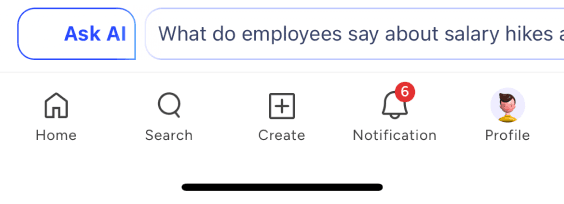
Search


Saptarishi Prakash
33 m
AVP of Design @ Swiggy
If I write this book, will you read this?
For a while now, I have been working on a project
that is very close to my heart. A book that more

KEY UI FEATURES & PROBLEM SOLVING
DISCOVERY - help users find mentorship opportunities naturally within their browsing flow.
Mentorship Discovery Module
ASSUMPTIONS
As part of the assignment, Before proceeding with the design, I’ve outlined a few key assumptions to ensure alignment on the task scope and expectations.
• The design would focus on mentor discovery, connect & slot booking (designs for chats, video conferencing and/ or any other mode of communication with mentees are not part of the scope)
• Creating a mobile-only design for users who in the assignment's context are mentees.
• Mentor's part of UI design is not in the scope
• Mentor's are assumed to be verified users of AmbitionBox who have been separately onboarded to this feature.
• As a part of it a certain defined set of details have been shared by the Mentors to create their respective "Mentor Profile" section.
LEGEND
Throughout the doc, I have used these visual elements as follows
Feature
Edge Case
OBJECTIVE
The objective of this assignment is to introduce a mentorship experience that feels approachable, organic-to-discover yet private within the AmbitionBox’s ecosystem. The design should enable controlled mentor discovery and connect without friction by establishing trust, transparency & anonymity.
APPROACH & THOUGHT PROCESS
To structure the entire flow I narrowed down on 4 key deliverables that built my approach. These served as the guardrails for me around which my design is based
01
Smooth Discovery with Control
Enable users to personalize their mentor search with smart recommendations while retaining control to filter as per their need
02
Guided Connection
Solving for the hesitation users feel while connecting with someone unknown by giving options around different way to connect and follow their activity on the platform.
03
Trust & anonymity
Platform with only verified mentors & giving the comfort of connecting with mentors with privacy
04
Seamless Integration
Blend with current UI without adding clutter.
USER FLOW
ENTRY POINTS
HOMEPAGE
TCS Interview page
SIde bar
User can follow mentor’s activity after following
Search
Saptarishi Prakash
33 m
AVP of Design @ Swiggy
If I write this book, will you read this?
For a while now, I have been working on a project
that is very close to my heart. A book that more
Key UI Features & Problem Solving
DISCOVERY - help users find mentorship opportunities naturally within their browsing flow.
Mentorship Discovery Module
Homepage
INTERVIEW PAGE
Objective:
Find an optimal method to discover the mentorship feature that is naturally engaging and does not feel out of place.
Design Rationale:
Banners are typically used for promotional messages or announcements.
Modules fit in well for this use-case to display structured content inviting the user to explore.
Modules are scalable to use following consistency & suggested practice from a development standpoint.
Benefits:
Engages the customer at the source of discovery
Feels native & coherent

Find Your Mentor
Objective:
Helping users to find personalized list of mentors tailored to their preferences instead of browsing through a generic list of unknown people.
Design Rationale:
Using personal profile signals
Seeking their target companies
This will help filter mentors with similar background and working/ have worked in the target companies, making them the most relevant guides for the user’s goals.
Benefits:
Users get more relevant mentor matches.
Skippable flow avoids friction or drop-offs.
With relevant suggestions users are more likely to engage and for longer.
The platform still collects useful signals for future personalization.
Homepage
Homepage
INTERVIEW PAGE

Search & Quick Filters
Objective:
Let users feel comfortable & in control of their discovery by providing them options to explore.
Design Rationale:
Keeping both options in the same module
Search Bar for active seekers
Smart & Detailed filter options for passive browsing
Benefits:
Accommodates users across different intents
Reduces friction for users preferring different styles or even if there is a need to use both for better discovery

Exploration - allow users to evaluate mentors transparently while preserving privacy and trust.
Profile Cards on Listing Page
Objective:
To keep users engaged in their discovery by providing key details about mentors and relevant quick action buttons.
Design Rationale:
Intuitively shortlisting & placing key information
Naukri Verified Tag - builds trust
Mentor-level Tags - availability, top rating etc
Ratings, Reviews, Experience
Relevant Personal Information
Quick CTAs
Benefits:
Quick trust signals
Immediate actions reduce friction enabling actions without the need to switch screens

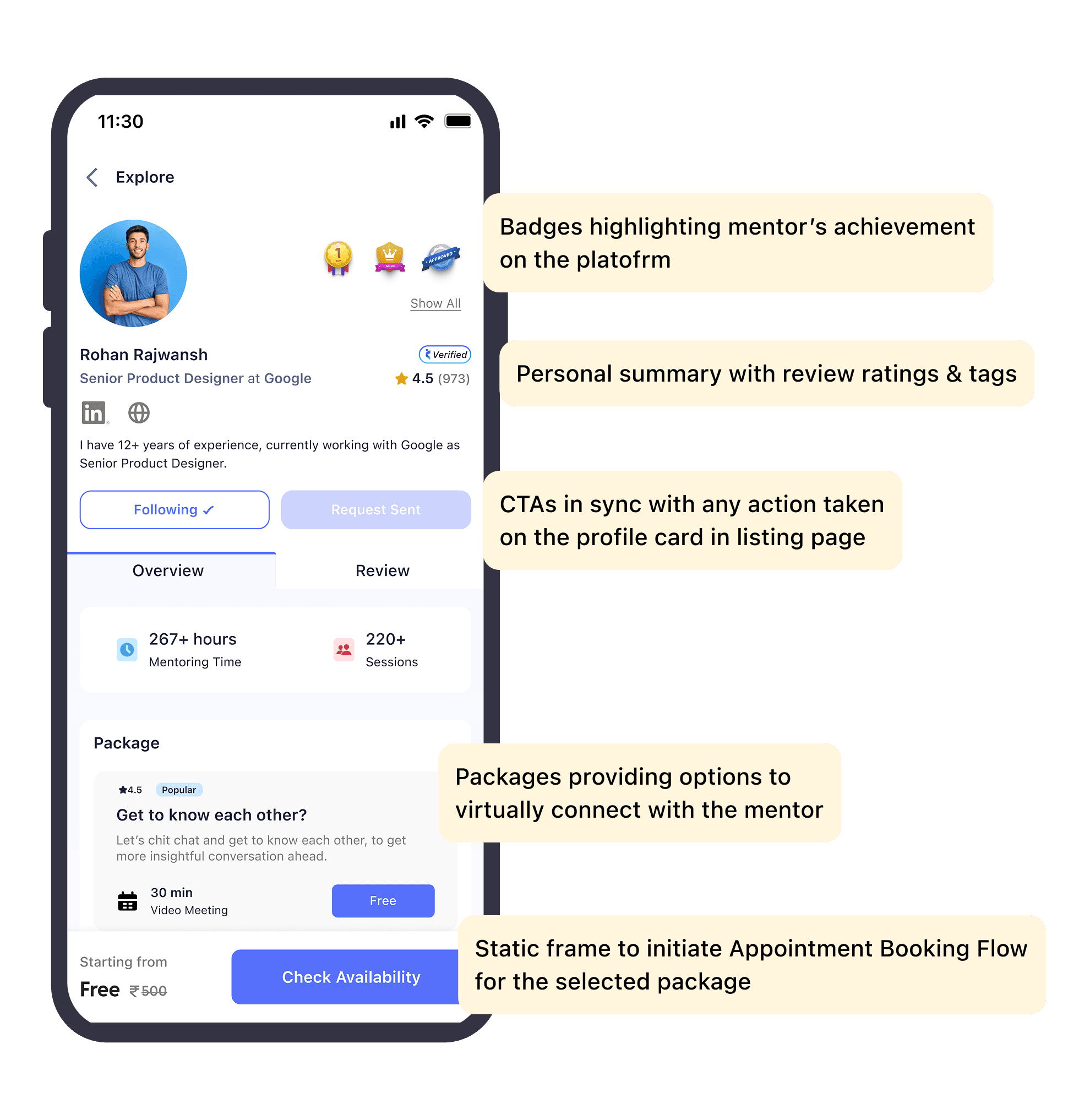
Detailed Profile Section
Objective:
Ensuring that the profile share the right mix of personal details and user feedback to support quick yet informed decisions of connecting with the mentor.
Design Rationale:
Structured profile screen
Badges showcasing achievements as a mentor
Overview Section - personal summary of the mentor
Packages for virtual one-on-one sessions
Detailed experience & education timelines
Review Section - user feedback on the mentor
Detail review by mentees
Smart feedback tags for quick summary
Benefits:
Quick & trust-building evaluation
Balances depth, transparency & scannability enabling user action within the limited attention-span

Connection- Reduce friction and hesitation in initiating mentorship conversations.
Connect Request Options
Objective:
Personalize while reaching out to mentor for high chances of connectivity but keep it optional
Option to connect anonymously as it is natural to feel hesitant while reaching out for personal feedback or guidance.
Design Rationale:
Allow customers to choose to connect as themselves and drop a note (optional) or as an alias name & with an alternate picture of choice via a simple toggle.
Benefits:
Increases exploration & eventual outreach
Builds more trust in the platform & feature
Lets the users be completely honest about the help they need without feeling exposed.

My MentorList Dashboard
Objective:
Enabling quick access to all cohorts for easier management & details around upcoming appointment information.
Design Rationale:
Provide a layout that prioritizes clarity, ease of access, and take immediate actions without navigating away.
Benefits:
Instantly view & manage upcoming sessions
Prominent & clear-labelled buttons for easy view
Single-pane dashboard avoids cognitive overload

Appointment Booking Flow
Objective:
For a more explorative discussion, mentees can connect virtually in a one-on-one session for in-depth guidance
Design Rationale:
Simple and intuitive appointment booking flow that is adaptive to mentor’s availability (provided beforehand) letting mentees choose from available dates & time slots.
Benefits:
Quick booking with no confirmation from mentor required (as slots are pre-aligned by mentor)
Adopts to mentor’s availability

Conversation- Support mentorship interactions with flexibility and ongoing comfort.
Chat & MEET Options
Objective:
Keeping all modes of communication within the app to maintain continuity & trust yet keep it intuitive, flexible and accessible.
Design Rationale:
Build features giving the users the options to stay connected with the mentor across chat, call (virtual one-on-one) or simply follow mentor’s activity on the platform
Benefits:
Reach out from anywhere across modules to initiate a chat or take actions.
Gives flexible ways to stay connected with the mentor
Multiple option for direct connects with the mentor
Let’s users opt for more personal connects for in-depth guidance via virtual connects
Future monetization for mentors & platform via consultations.

Empty States & Edge HandlinG

SUGGESTIONS FOR FUTURE ENHANCEMENT
Mentee’s Perspective
Session Management – Provide an interface for mentees to view, reschedule, or cancel sessions, with real-time updates for any mentor-initiated changes.
Post-Session Feedback Flow – Enable mentees to rate sessions (1–5 stars), share detailed reviews, and select quick-feedback tags that can later enrich mentor’s detailed profile section and also be part of filters for feedback-based search.
AI-driven Session Summaries – Generate automated summaries capturing discussion points and action items post-session for easy reference at any point in time.
Progress Tracking – Offer mentees a visual overview of completed sessions, learning goals, and feedback history to track their growth over time.
Homepage Feed Integration – showcase public posts and updates from mentors a user follows for continuous engagement and discovery.
Mentor’s Perspective
Verification Flow & Onboarding - To enable more mentee interaction, create a flow to automatically verify users registering as mentors via naukri.com to utilise ecosystem capabilities and also pre-fill all necessary information for user onboarding.
Mentor’s Followers – Display follower count and engagement insights once mentors reach meaningful traction levels.
Monetization Options – Introduce paid consultation calls or tiered mentorship plans to enable premium, high-value interactions.
Schedule Management Tool - Mentor to provide availability to ensure slots are visible for mentees to block for connects.
Session Management - Similar to mentees, mentors to have a tool to manage blocked slots and make changes if required. Such changes can later be used to signify slot adherence by the mentor. Eg: 96% means 4 out of 100 slots scheduled are rescheduled/ cancelled (could become an important parameter to display on profile card)
Talk Design Over Chai?
If you’ve scrolled this far, maybe we’re meant to chat.
Sharmishtha, 2025
Made with ❤️
Objective:
Find an optimal method to discover the mentorship feature that is naturally engaging and does not feel out of place.
Design Rationale:
Banners are typically used for promotional messages or announcements.
Modules fit in well for this use-case to display structured content inviting the user to explore.
Modules are scalable to use following consistency & suggested practice from a development standpoint.
Benefits:
Engages the customer at the source of discovery
Feels native & coherent
Homepage
INTERVIEW PAGE
FIND YOUR MENTOR
Objective:
Helping users to find personalized list of mentors tailored to their preferences instead of browsing through a generic list of unknown people.
Design Rationale:
Using personal profile signals
Seeking their target companies
This will help filter mentors with similar background and working/ have worked in the target companies, making them the most relevant guides for the user’s goals.
Benefits:
Users get more relevant mentor matches.
Skippable flow avoids friction or drop-offs.
With relevant suggestions users are more likely to engage and for longer.
The platform still collects useful signals for future personalization.
Homepage
INTERVIEW PAGE
SEARCH AND QUICK FILTERS
Objective:
Let users feel comfortable & in control of their discovery by providing them options to explore.
Design Rationale:
Keeping both options in the same module
Search Bar for active seekers
Smart & Detailed filter options for passive browsing
Benefits:
Accommodates users across different intents
Reduces friction for users preferring different styles or even if there is a need to use both for better discovery
EXPLORATION - allow users to evaluate mentors transparently while preserving privacy and trust.
PROFILE CARDS ON LISTING PAGE
Objective:
To keep users engaged in their discovery by providing key details about mentors and relevant quick action buttons.
Design Rationale:
Intuitively shortlisting & placing key information
Naukri Verified Tag - builds trust
Mentor-level Tags - availability, top rating etc
Ratings, Reviews, Experience
Relevant Personal Information
Quick CTAs
Benefits:
Quick trust signals
Immediate actions reduce friction enabling actions without the need to switch screens
DETAILED PROFILE SECTION
Objective:
Ensuring that the profile share the right mix of personal details and user feedback to support quick yet informed decisions of connecting with the mentor.
Design Rationale:
Structured profile screen Badges showcasing achievements as a mentor
Overview Section - personal summary of the mentor
Packages for virtual one-on-one sessions
Detailed experience & education timelines
Review Section - user feedback on the mentor
Detail review by mentees
Smart feedback tags for quick summary
Benefits:
Quick & trust-building evaluation
Balances depth, transparency & scannability enabling user action within the limited attention-span
CONNECTION - Reduce friction and hesitation in initiateing mentorship conversation
CONNECTION REQUEST OPTION
Objective:
Personalize while reaching out to mentor for high chances of connectivity but keep it optional
Option to connect anonymously as it is natural to feel hesitant while reaching out for personal feedback or guidance.
Design Rationale:
Allow customers to choose to connect as themselves and drop a note (optional) or as an alias name & with an alternate picture of choice via a simple toggle.
Benefits:
Increases exploration & eventual outreach
Builds more trust in the platform & feature
Lets the users be completely honest about the help they need without feeling exposed.
MY MENTORSHIP DASHBOARD
Objective:
Enabling quick access to all cohorts for easier management & details around upcoming appointment information.
Design Rationale:
Provide a layout that prioritizes clarity, ease of access, and take immediate actions without navigating away.
Benefits:
Instantly view & manage upcoming sessions
Prominent & clear-labelled buttons for easy view
Single-pane dashboard avoids cognitive overload
APPOINTMENT BOOKING FLOW
Objective:
For a more explorative discussion, mentees can connect virtually in a one-on-one session for in-depth guidance
Design Rationale:
Simple and intuitive appointment booking flow that is adaptive to mentor’s availability (provided beforehand) letting mentees choose from available dates & time slots.
Benefits:
Quick booking with no confirmation from mentor required (as slots are pre-aligned by mentor)
Adopts to mentor’s availability
CONVERSATION - Support mentorship interactions with flexibility and ongoing comfort
CHAT AND MEET OPTION
Objective:
Keeping all modes of communication within the app to maintain continuity & trust yet keep it intuitive, flexible and accessible.
Design Rationale:
Build features giving the users the options to stay connected with the mentor across chat, call (virtual one-on-one) or simply follow mentor’s activity on the platform
Benefits:
Reach out from anywhere across modules to initiate a chat or take actions.
Gives flexible ways to stay connected with the mentor
Multiple option for direct connects with the mentor
Let’s users opt for more personal connects for in-depth guidance via virtual connects
Future monetization for mentors & platform via consultations.
EMPTY STATE AND EDGE HANDLING


SUGGESTIONS FOR FUTURE ENHANCEMENT
MENTOR's PERSPECTIVE
Session Management – Provide an interface for mentees to view, reschedule, or cancel sessions, with real-time updates for any mentor-initiated changes.
Post-Session Feedback Flow – Enable mentees to rate sessions (1–5 stars), share detailed reviews, and select quick-feedback tags that can later enrich mentor’s detailed profile section and also be part of filters for feedback-based search.
AI-driven Session Summaries – Generate automated summaries capturing discussion points and action items post-session for easy reference at any point in time.
Progress Tracking – Offer mentees a visual overview of completed sessions, learning goals, and feedback history to track their growth over time.
Homepage Feed Integration – showcase public posts and updates from mentors a user follows for continuous engagement and discovery.
MENTEE's PERSPECTIVE
Verification Flow & Onboarding - To enable more mentee interaction, create a flow to automatically verify users registering as mentors via naukri.com to utilise ecosystem capabilities and also pre-fill all necessary information for user onboarding.
Mentor’s Followers – Display follower count and engagement insights once mentors reach meaningful traction levels.
Monetization Options – Introduce paid consultation calls or tiered mentorship plans to enable premium, high-value interactions.
Schedule Management Tool - Mentor to provide availability to ensure slots are visible for mentees to block for connects.
Session Management - Similar to mentees, mentors to have a tool to manage blocked slots and make changes if required. Such changes can later be used to signify slot adherence by the mentor. Eg: 96% means 4 out of 100 slots scheduled are rescheduled/ cancelled (could become an important parameter to display on profile card)
Talk Design Over Chai?
If you’ve scrolled this far, maybe we’re meant to chat.
Sharmishtha, 2025
Made with ❤️